
VUE项目地址去掉 # 号的方法
6801
VUE项目地址去掉 # 号的方法,vue 项目往往会搭配 vue-router 官方路由管理器,它和 vue.js 的核心深度集成,让构建单页面应用变得易如反掌。vue-router 默认为 hash 模式,使用 URL 的 hash 来模拟一个完整的 URL,所以当 URL 改变时,页面不会重新加载,只是根据 hash 来更换显示对应的组件,这就是所谓的单页面应用。
但是使用默认的 hash 模式时,浏览器 URL 地址中会有一个 # ,这跟以往的网站地址不太一样,可能也会让大部分人不习惯,甚至觉得它很丑。
想要去掉地址中的 # 也不难,只要更换 vue-router 的另一个模式 history 模式即可做到。如下:
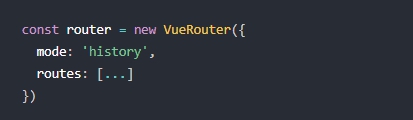
当你使用 history 模式时,URL 就变回正常又好看的地址了,和大部分网站地址一样,例如:http://zztuku.com/name/id
不过,这种模式有个坑,不仅需要前端开发人员将模式改为 history 模式,还需要后端进行相应的配置。如果后端没有正确的配置好,当你访问你的项目地址时,就会出现 404 ,这样可就更不好看了。
官方给出了几种常用的后端配置例子:
Apache:
<IfModule mod_rewrite.c>
  RewriteEngine On
  RewriteBase /
  RewriteRule ^index\.html$ - [L]
  RewriteCond %{REQUEST_FILENAME} !-f
  RewriteCond %{REQUEST_FILENAME} !-d
  RewriteRule . /index.html [L]
</IfModule>
Nginx:
location / {
  try_files $uri $uri/ /index.html;
}
原生 Node.js
const http = require('http')
const fs = require('fs')
const httpPort = 80
http.createServer((req, res) => {
  fs.readFile('index.htm', 'utf-8', (err, content) => {
    if (err) {
      console.log('We cannot open "index.htm" file.')
    }
    res.writeHead(200, {
      'Content-Type': 'text/html; charset=utf-8'
    })
    res.end(content)
  })
}).listen(httpPort, () => {
  console.log('Server listening on: http://localhost:%s', httpPort)
})
IIS:
<?xml version="1.0" encoding="UTF-8"?>
<configuration>
  <system.webServer>
    <rewrite>
      <rules>
        <rule name="Handle History Mode and custom 404/500" stopProcessing="true">
          <match url="(.*)" />
          <conditions logicalGrouping="MatchAll">
            <add input="{REQUEST_FILENAME}" matchType="IsFile" negate="true" />
            <add input="{REQUEST_FILENAME}" matchType="IsDirectory" negate="true" />
          </conditions>
          <action type="Rewrite" url="/" />
        </rule>
      </rules>
    </rewrite>
  </system.webServer>
</configuration>
Caddy:
rewrite {
    regexp .*
    to {path} /
}
Firebase 主机:
在你的 firebase.json 中加入:
{
  "hosting": {
    "public": "dist",
    "rewrites": [
      {
        "source": "**",
        "destination": "/index.html"
      }
    ]
  }
}
以上,就是VUE项目地址去掉 # 号的方法,更多也可以参考:https://router.vuejs.org/zh/guide/essentials/history-mode.html
本文网址:https://www.zztuku.com/detail-7872.html
站长图库 - VUE项目地址去掉 # 号的方法
申明:如有侵犯,请 联系我们 删除。





您还没有登录,请 登录 后发表评论!
提示:请勿发布广告垃圾评论,否则封号处理!!